Replace standups
Replace Standups with GitHub Activity Digests
A standup asks people to remember what they shipped. A GitHub activity digest reads the repositories you pick and posts that summary to Slack and email.
Git Digest is the team product for that job. Sign in with GitHub, choose the repos, and let the digest replace the status round.
From GitHub to Slack and email
- Sign in with GitHub and open the workspace.
- Pick the repositories that should be digested. Only those repos are included.
- Choose daily or weekly, the organization timezone, and a delivery hour. A daily digest covers the previous 24 hours. A weekly digest covers the past week and is prepared on Mondays.
- Turn on the email digest. It goes to workspace members who have email delivery on, at the email hour.
- Connect Slack from the dashboard. The connection stores a channel, and the dashboard shows that channel name. Set a separate Slack delivery hour for the same digest.
- Optional: turn on the public link for a repository. Anyone can open that changelog without signing in, and they cannot see the rest of Git Digest.
Digests are prepared for workspaces with an active subscription. The homepage Unlimited plan is $29 per month, or $25 per month on yearly billing, for the team rather than per seat. A lifetime option is $1,000 once.
What the digest actually says
Each change is a short summary, the author, and a link back to GitHub. When the change belongs to a pull request, the link uses that pull request number. Otherwise it uses a short commit id.
Slack groups the lines under Feature, Bugfix, Improvement, Chore, and Refactoring. The header is the date for a daily digest, or the date range for a weekly one. Email shows the first five changes in each repository, with lines added and removed. If the window is empty, Slack says there were no code changes.
An optional Friday leaderboard can also go out by email and Slack. It ranks lines changed for the week. It is a separate send from the commit digest, and you turn it on in the same delivery settings.
Standup vs a commit digest
| Topic | Live standup or form | GitHub activity digest |
|---|---|---|
| Who writes the update | Each person, out loud or in a form | Nobody. The repositories do |
| Source of truth | What someone remembers | Commits and pull requests that landed |
| Cadence | A meeting on the calendar | Daily (previous 24 hours) or weekly |
| Where it lands | The call, or a bot thread | Email and a Slack channel |
| Work that is not in git | Someone can still say it | Invisible, unless it was committed |
A public changelog you can open
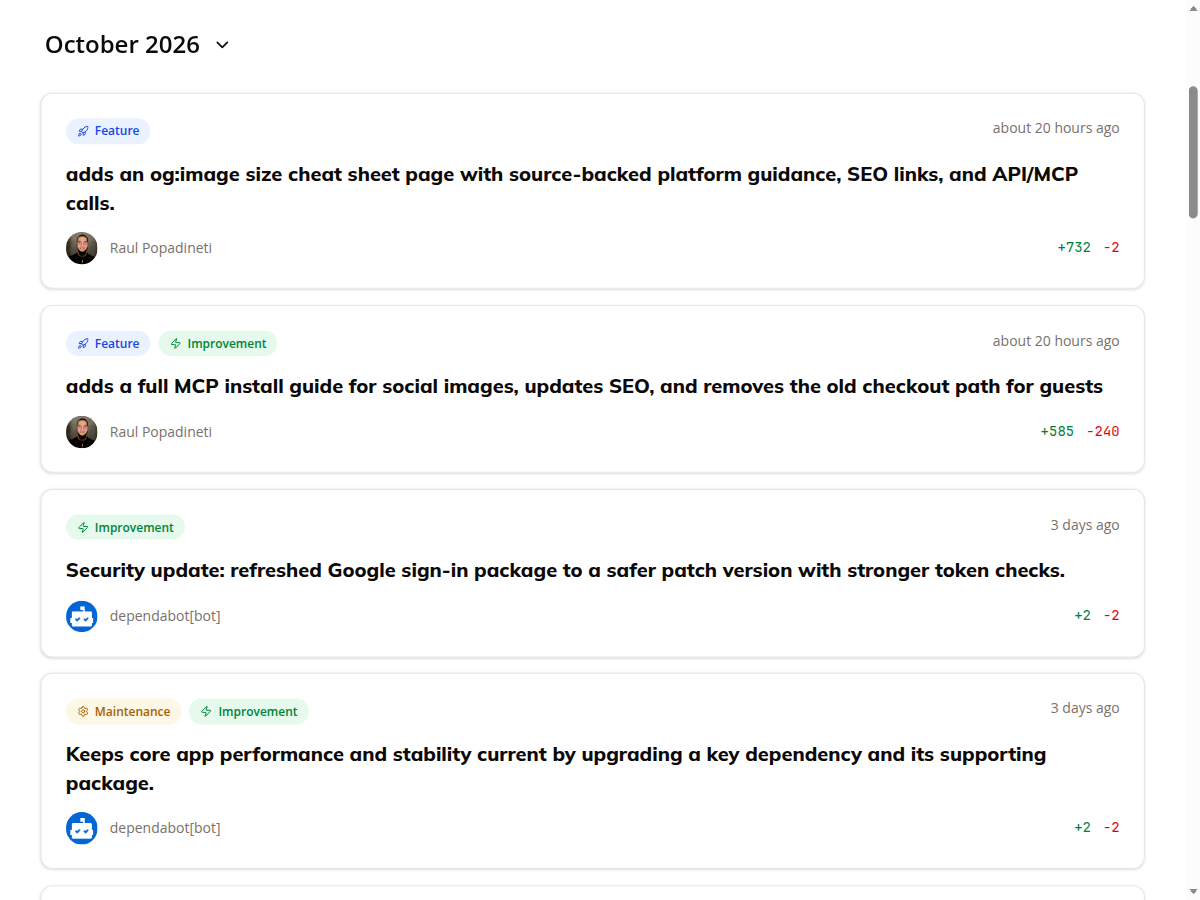
Repositories with the public link on are listed at /changelogs/sunergos-ro. Open one repo, such as sunergos-ro/og-pilot, and you get the same kind of summary the digest is built from: one sentence per change, the author, and lines added and removed, grouped by month. Filters cover features, improvements, and bug fixes.
That page is the public changelog, not the Slack message. Slack and email are the scheduled copy for the team. The public page is what you share when a repository should be readable without a login.
When not to drop the standup
Use a digest when the engineering update is already in GitHub. Use a form, or keep a short live standup, when the work is hiring, support, design, or anything that never becomes a commit. The standup bots comparison is the page for that choice. The async standup playbook covers cadence, blockers, and timezones if you still want a written update from people.
If the reason to switch is the cost of the meeting, the daily standup cost page prices a 15-minute ritual, and the meeting cost calculator takes your own salary and duration.
Git Digest is not Gitingest. Gitingest turns a repository into text for an LLM. This product posts a team digest. The GitHub digest comparison spells that out.
Replace standups FAQ
How the GitHub to Slack and email workflow works, and when a form is still the better fit.
How do I replace a standup with GitHub activity digests?
Sign in with GitHub, pick the repositories for the workspace, and choose daily or weekly delivery in your timezone. Turn on email for workspace members, and connect Slack if you want the same digest in a channel. The summary comes from the commits that landed, so people do not retype the standup.
What does each digest contain?
Each change is a short summary, the author, and a link to the commit or pull request on GitHub. Slack groups those lines by tag: Feature, Bugfix, Improvement, Chore, and Refactoring. Email shows the first five changes in each repository, plus lines added and removed. If nothing landed, Slack says there were no code changes for that window.
Can I send the digest to both Slack and email?
Yes. Email goes to workspace members who have the email digest turned on, at the email hour you set. Slack goes to the channel stored when you connect Slack, at the Slack hour you set. Daily covers the previous 24 hours. Weekly covers the past week and is prepared on Mondays.
When should the team keep a standup or a form?
Keep a live standup or a form when the work never touches GitHub. Hiring, support, and sales updates are not in the commit log. A form bot is a better fit for those teams. A commit digest only reports what landed in the repositories you selected.
Is the public changelog the same message as Slack?
No. The public changelog is a shareable page for repositories you mark with a public link. Anyone can open it without signing in, and they cannot see the rest of Git Digest. Slack and email are the scheduled delivery to the team. Both use the same kind of summary: one sentence per change.
Is Git Digest the same as Gitingest?
No. Gitingest turns a repository into text for an LLM prompt. Git Digest summarizes what landed in GitHub and posts that digest to Slack and email for the team.
Post the digest instead of collecting status
Connect GitHub, pick the repositories, and send daily or weekly commit summaries to Slack and email.
Start with GitHub